Riding the Tiger

Media_httpcaseycomblo_dbuic

In the past I haven’t been the sort to rush out and get a new OS on Day 1. I mean really, if your computer is working, then why not wait a few weeks and let other bleeding edgers discover any lingering bugs for you? But the reviews for Apple’s new OS v.10.4, also known as Tiger, have been roundly positive and with my new Pbook barely two weeks old, I just had to have the latest and greatest, right?!

So far so cool. As system upgrades often do, Tiger incorporates a number of useful shareware items I’ve grown used to. The weather widget won’t replace WeatherPop for me, but Spotlight seems certain to mean the end of LaunchBar. I’m also not sure if the RSS feeds in Safari will replace my Newsreader NetNewsWire, but again, we’ll see.

I haven’t played with Automater much yet, seems to be friendly only with Apple apps that know what to do with it. But I’m looking forward to smart folders in Mail and Address Book.

Bottom line, if you’re a Mac user, get your Tiger. If you’re not a Mac user, then I’m very sorry for you.

Money Earned & Comments Blocked

Since relocating and rebuilding casey.com and this blog, I have been enjoying the benefits of two new features; Google Ads and MT-Blacklist.

In the six weeks since I joined Google’s Adsense program and added the Google Ads that appear in the top banner of this blog and the search block that appears on the main page, I have earned $15. It’s not exactly a start to the kid’s college fund, but it’s thirty-five cents a day. I’m the sort that will stop and pick up a lucky penny if I come across it, so seven nickels a day is not too shabby. I don’t maintain this site to generate income, but I’ll take it if it comes my way. Besides, it’s kind of fun to see what kind of ads Google matches up with my varied postings.

The other big improvement was installing Jay Allen’s Movable Type Plug-in module for blocking comment and trackback spam, MT-Blacklist. Since re-launching this blog, MT-Blacklist has blocked 1,042 comment spams and removed numerous unwelcome trackback pings from appearing here. To all of the online low-lifes who wish to muddy my blog with their unwelcome pitches, I’m glad to say ‘piss off’. The only ads here will be the ones I invite.

So tonight I took the $15 that I have earned from Google, and donated it to Jay Allen. It’s not enough, but it’s something. Thank you Jay, your work is much appreciated.

Google Maps

For a long time I have preferred using Yahoo! Maps over MapQuest. It just seemed to me that Yahoo’s offering provided more features and often found locations that MapQuest could not. But move over boys, there’s a new kid on the block.

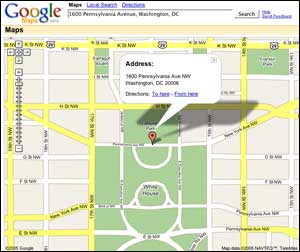
Google has launched a beta version of a new service called Google Maps. My early review is that it leaves the others in it’s dust. As with Google’s other resources, the interface is much cleaner than both Yahoo and Mapquest, not cluttered with advertisements. Some may appreciate the direct links for finding things such as ATMs or WiFi hotspots on Yahoo and Mapquest, but Google Maps takes a more Google’ish approach. Looking for something in particular? Type it into the ‘Local Search’ box and see what you get.

I used a well-known address in an experiment to compare results among these three services; 1600 Pennsylvania Avenue, Washington, DC, better known as The White House (find each map yourself here: <a href=”http://us.rd.yahoo.com/maps//maps/extmap/%2A-http://maps.yahoo.com//maps_result?csz=Washington%2C+DC+20502-0001&state=…“>Yahoo, Mapquest, and Google). Of the three, only Google accurately places it’s marker for this address (maybe I’m nitpicking, Yahoo’s star lands on the entrance gate, but Mapquest lands on the wrong street, providing a back yard view of the White House from the Ellipse).

There are still a few things to be sorted out. Don’t look for a ‘bar’ near the White House, unless it’s a Bar Association you’re after. Maybe a ‘pub’? That will get you to Pueblo Memorial Airport in Colorado, no matter what your starting point. Try ‘tavern’ for better luck. And for Mac users, Google admits it’s not quite working yet in Apple’s Safari browser (my default), but that they’re working on it.

Yesterday Google Map’s directions helped us navigation our way to a high-school in Faquier County, about 45 miles away, without few hitches. The printed map didn’t highlight the route like the on-screen one, and the directions came on page 2, requiring a run back into the house from the driveway to grab them. Minor bumps. All in all, I’m eager to see how Google Maps develops. It’s off to a promising start.

Testing MarsEdit 1.0

So the Mac blogs are abuzz about a new application for Mac bloggers called MarsEdit. I was intrigued enough to download it and give its trial run a spin, and so this is my first test post using it. I’ll update, edit and otherwise mess with this posting to see how well MarsEdit works with my MT based blogs, and I’ll report my findings to you here. Is it good enough to buy? Stay tuned…

So, that post went up, but I didn’t see the opportunity to put it in a category. These later edits are being done via MT as usual. But I’ll press on and save reading any manuals for later 🙂

Aha… so when I click the ‘Refresh’ button on MarsEdit, it grabbed the 10 most recent posts to my blog, along with their categories. So this edit, is again being done in MarsEdit rather than MT. The research continues…

UPDATE: How cool is that? A comment from the programmer! Thanks for the help Brent. So here’s another test… if I edit an existing post using MarsEdit, will the comments survive the update? Here we go to find out… yup, they sure do. Good to know 🙂

UPDATE: OK, so when my demo period ended, MarsEdit passed the ultimate software test. I just missed it too much not to buy it, so I did. Great stuff Brent, keep it up!

Fighting Back Against Spam

Last November, Lycos Europe launched a web service called ‘Make Love, Not Spam‘ which allowed visitors to download a unique screen saver. The goal was to serve a little payback in unwanted traffic to the web sites promoted in spam email messages. The screen saver happily sent endless requests to these servers, slowing their ability to churn out their unwanted messages. Criticized for using tactics of the sort more often employed by hackers and others who might launch such a denial of service attack, Lycos shut down the service.

I’m glad to see that creative efforts to fight back aggressively agains spam are being explored and implemented. Even if this particular approach has crossed the line somewhere (where was the ‘Make Love’ part of this, on the screen saver?), I applaud Lyco Europe for trying to do something, and hope they’ll keep at it. Fighting spammers in court, as was successfully done recently in Virginia, is great, but it’s only one weapon in the fight against spam. And global fight that it is, won’t always be an available option.

The real problem will never be solved. Spam only works because people are stupid, and it only takes a few boneheads who think that cheap VIAKAGARA is only a click away to force those of us who know better to pay the price for their ignorance in the spam we receive as a result. Idiots.

Anti-spam screensaver scrapped
BBC, 12/6/04

UPDATE: Slashdot reports that a trojan horse virus is being distributed under the false promise that it is the installer of the Lycos Anti-Spam screensaver. Jeesh… you really just can’t win for trying can you.

Fun With Photomosaics

We’ve all seen a Photomosaic before, an image that is produced by combining many other smaller images. They’re really cool. I recently discovered a cool Mac program called MacOSaiX that makes them, and it’s really cool too.

Here’s an example…

(click for larger version)

The program allws you to identify source photos from a local drive, a Google image search, or by using random glyphs from your font collection. In this image I used my local iPhoto library and the program used 4,411 photos to produce this mosaic which is measures as 84.1% in ‘Mosaic Quality’. And check out the detail; the trim on the shed in the background, the dogs furry tail, the shadowy patches of snow. Way cool.

It takes a bit of time, and I’m still on the quest for producing a really high-quality photomosaic. But just playing with it is fascinating… the program I mean. Give it a try.

A Friend in the News

Media_httpgraphics7ny_cjiri

OK, maybe it’s not ALWAYS self-promotion here. The July 5th edition of the New York Times included a very interesting article titled “Knowing Their Politics by the Software They Use“. In the article, my friend and colleague David Brunton (shown in a dashing pose at right) and others discussed the appearance and background of the seeming preference for use of open source software by Democrats and progressive organizations, and of Republicans and the right for proprietary options. It’s well worth a read. Later, we’ll discuss the politics of Macs vs. PCs 🙂

In Need of a New Gadget

Lately, my technology has been failing me. It’s like a fatal flu season has swept through much of the tech around me. It started with a simple boom box, nothing special, radio/tape/cd. But suddenly, the CD player stopped working. What’s up with that?

The next to go was my Palm Pilot. This is my second Palm to die an early death, and so I’m not particularly eager to throw any more money these ways. But as I consider alternatives, I need to sort through so many options.

I’ve always found it to be stupid that I need to look up someone’s phone number, when the place I really need their number is ON MY PHONE! But I’m not sure I’ve found the phone I want yet either.

Being a Mac guy, it would be cool if my new gadget worked with iSync. I’m currently with Verizon Wireless, and so if I didn’t have to switch away from them, that would be a plus, although now that I can take my number with me, that may be less of an issue.

I dunno. If I can find a way to converge my cell phone and my pda into a single, Mac-friendly device, I guess that’s what I’m looking for. Any suggestions anyone?

Politics Online/Netpulse/Bookmarks

I was invited by NetPulse, The E-Journal of Politicking on the Internet, to share my five favorite web sites that I would recommend for anyone’s bookmark collection.

Chris’ Top Ten Milestones for Congress on the Internet

or… Highlights and Lowlights for the Hill on the Net

  1. Senator Robb accepts e-mail (late ’93)
    Hill staffers still haven’t forgiven him


  2. Senator Kennedy launches web site (May ’94)
    How’s this for an easy to remember URL?
    http://www.ai.mit.edu/iiip/projects/kennedy/homepage.html


  3. House Republicans restrict access to Committee Minority sites (6/96)
    Hill web becomes a political weapon


  4. Animations abound (early 97)
    Waving flags, flying letters, & Rep. Traficant ‘Bangin’ Away’


  5. Write-Your-Rep & Web Forms (early 97)
    Attempting to stem the e-mail flow with zip lookups and web forms


  6. Daschle Tree Cam (11/97)
    It’s not just about politics, and a tradition is born.


  7. Starr Report goes Online (9/98)
    Hill servers grind to a halt under the weight of the demand


  8. Senate get hacked, twice (5/99, 6/99)
    Senate staff access restricted as a result


  9. 100 Senators Online (3/00)
    Illinois Sen. Peter Fitzgeral makes it unanimous


  10. Senator Clinton’s Day One Web Launch (1/01)
    Sen. Clinton launches site on day one, fastest yet.

Disagree? Don’t sit there stewing about it, tell me! You’ll feel better…chris@casey.com.
Then go write your own list 🙂


© 2001 by Chris Casey
Delivered at American University’s Forum on Congress and the Internet, 5/4/01. (see the video)

1 3 4 5 6